Posts

Showing posts with the label unity

Week 19 - Unity

Image
I was really interested in this first tutorial for Unity this week as I had done things with text and image overlays for my game last semester. I did it at a basic level and didn't really understand the whys, just understanding what I was doing. This tutorial was the next level or so on from what I'd done but also explained the basics so I enjoyed it and didn't feel out of my depth.  I really liked customising everything - I hadn't done that last semester. The little touches like adding the character portrait were fun. I hadn't made a health bar but the fundamentals were there so again, I didn't feel out of depth but definitely felt like I was learning something . Though the tutorial was a little bit tedious, it wasn't too bad. (screenshot of my script for the Health Bar at the end of the first tutorial) Then I started on the second tutorial. My favourite part was adding dialogue, I found that so interesting and nothing like we'd done this semester or la...

Week 18 - Unity Tutorial

Image
This week, I had some problems to fix which thankfully, after troubleshooting, asking friends and also just messing around it worked! The only issue I had in the end, although it's working just not recommended, is Visual Studios wouldn't work so I'm still using Dreamweaver.  The coding for the World Interactions tutorial was a bit confusing and I did get there eventually. I definitely found it a bit harder because it was code I didn't recognise and when things did go wrong, I felt a bit out of depth. But again, I turned to friends and we eventually worked it out. What I did like was exploring the new components that could be added. Seeing it come together and the small things that these components could do, I was really interested. Then it was back to coding and tidying up. My code for Ruby looked like this (yes, bits are missing but they were there when I scrolled!): (screenshot of my code for my Ruby Controller script) I then moved on to this week's tutorials. Aga...

Week 17 - Unity

Image
This tutorial was on the harder side for me. First, I started the Sprite Animation. I didn't struggle too much at the start with code or actions, I just couldn't find some of the windows and places where I had to make the changes. After a Google search I eventually found what I needed. The animation creation of the robot is quite tedious and it takes a lot of repetition but I definitely know how to do it now.  Next, the Ruby animation was already set up so I flew through that. It was interesting looking at what triggers what and the actions it creates.  I struggled a lot with the second tutorial. I followed the code and checked it over and over but when it got to making a projectile prefab game object in my code, it did not show up in the editor anywhere. Unfortunately, I really needed to work it out to continue on. I googled it and tried everything but it just wouldn't work. I also messaged the class in Slack but no one got back to me. I've spent over 3 hours just tryi...

Week 16 - Unity Tutorial 3

Image
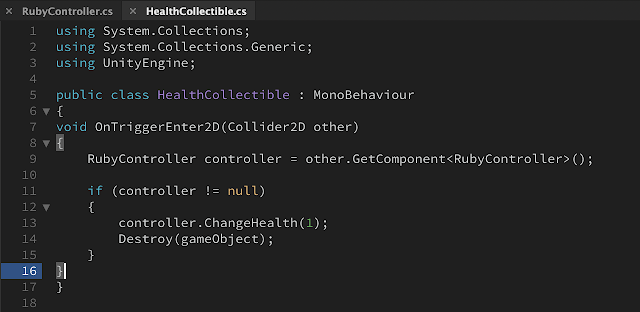
 In the first tutorial, the tutorial went through adding a health bar. I thought it was really interesting and it was nice to be using scripts again. So far there's been less coding involved which is nice, since I don't like code that much, but when it does come up it is a nice change. The health bar was also something I'd never done before so I enjoyed creating one myself.  (screenshot, my healthcollectible script) The scripts got a bit confusing toward the end but there was a 'check your script' part which was incredibly helpful. Before finding that, I had keep moving and deleting things in the script because I couldn't work out where it belonged. The error went away, somehow, but it wouldn't work. That's when the script check became useful. Then I went on to the next tutorial about taking damage. This was interesting when we added the enemy and started using everything from before to build the enemy. There was a lot of coding in this tutorial and it d...

Week 15 - Unity Tutorial

Image
This week, I began my Unity tutorials decorating the world of Ruby's adventures. There was a lot of small bits here, fixing this and that but it was nice to see how big a difference small changes make.  (screenshot, where I put my metal cube) Then, I had make a prefabs folder and eventually, change the colour of my metal cube to a different colour. I chose pink but it looks red.  (screenshot, my different coloured metal cube) I found this tutorial helpful as it was showing me what I can do with something I'm adding to the scene that isn't just scripts. I really liked that element and had some fun with it. The next was about making Ruby work correctly in her world. First was using rigidbodies. We used them for 3D last year, so I'm interested to see if they're any different in 2D.  I find it really helpful when the steps are explained and I can see why  I'm doing something, what it does. It helps to build my knowledge for the next tasks, whereas last year I felt l...

Week 14 - Unity Tutorial

Image
This week, I had a few tasks to do. Initially, I had to redownload Unity and the Unity Hub because I know you (very fortunately) got a new laptop this semester. This was a bit more difficult than it should have been because I had used Unity on Windows last year and this year it's on a Mac so somethings were a little different and I also just forgot what to download. Then I struggled with getting the project to open but got there eventually. The first task was setting up the project - Ruby's 2D Adventure and then running through controls and views which we would've been familiar with from last year anyway. It was important though because it reminded me of things I would definitely forget when I'd need them most. The next task was to put Ruby into her new world. I had another issue with this as a few of the instructions we were given didn't match up to what actually needed to be done. I finally got some things done, got the script filled in and I encountered yet anoth...

Week 10 - Unity Tutorials - Countdown Timer

Image
Last week, when I was doing my project, I realised that my timer was set at 59 seconds and that I couldn't add minutes - I thought this needed changing. I found three tutorials to see if I could find a way to add to the timer I already have rather than to completely change it considering it took me quite a bit to get it to work. I selected three tutorials to try out separately and then I'll try and incorporate them into my project on Friday when I do it.  ( pinterest.com , digital alarm clock showing 9:24am) Firstly, I created a 'slider' timer which was really cool. It worked after the usual bumps along the way. I also felt more comfortable with the code than I have been because I'd used most of it when I was doing last week and the week befores' work on the project. However, I don't think this timer would suit my game. I just wanted minutes and seconds, not slider or anything fancier. I also don't need hours or milliseconds but  it was interesting. Then...

Week 09 - Unity Tutorials

Image
  (kid playing with a soccer ball, freedesignfile.com ) I 100% had war flashbacks for this last lesson. It didn't help me much having a bit of experience with for loops though. They're still just as confusing now as they were two years ago, but that's okay!  It did come back to me and I wouldn't say I struggled in terms of following along but I wouldn't say I'd be confident in doing it myself with no direction or pre-written code in front of me just to edit. The latter part of the last lesson was a bit easier as it was back to stuff we'd kind of done so I felt less out of my depth there. No pun intended, but the for loops kind of through me through a loop. The challenge was manageable but I did find myself, as usual, going back and having to look through the previous lesson. I used to try and do it without looking through the explanations below the video but I found it too frustrating and I'd rather give it a proper go then just look at everything and ge...

Week 08 - Unity Tutorials

Image
 In this week's Unity tutorials, we learned a few different things, as per usual. Firstly, we started working on cameras and focal points. I actually liked lesson 4.1 because it was different from the other ones and a refreshing lesson. I found it a bit easier to follow because  it was different and new so I accepted it for what it was. We the other tutorials, even though I don't know all that much, I'm trying to guess the answers or recall what I do know. This was a nice change.  (screenshot of the game play from the introduction video for lesson 4 on unity.com ) I enjoyed adding the different materials in lesson 4.2 but struggled a bit with the scripts. I usually have to rewatch or check the script a few times because my visual studios doesn't automatically fill in any words like the person teaching often finds in his programme. Lesson 4.3 was, again, hard to keep up with in terms of all the new scripts. I'm trying to work on this but honestly, I'm not sure wh...

Week 7 - Unity Tutorial 6

Image
  (screenshot from introduction to lesson 3.4 video, character running with forest in the background) In this lesson we learned about sound effects. I didn't mind the lesson but I did find it hard to keep up in certain parts where I had to rewatch the video or sections of the video more than two or three times. It was interesting though because it was something a bit outside of the moving, jumping etc.  We also learned about particles and creating something like an explosion. I thought it was cool. I like that we've moved past the walking forward and the likes. I just find it more interesting. I understand the basics are important and the grand scheme of things, I don't understand the interesting stuff any more than the basics but I think because I find it more interesting, I'm more willing to listen more and try harder because I want to replicate the 'coolness'. I really struggled with the challenge and had to keep going back on the videos from this week and la...

Week 06 - Unity Tutorial 05

Image
  (unity logo, en.wikipedia.org) I found this week of the Unity tutorials a bit better. Maybe because everything from before is a bit more recognizable or maybe because it was an easier tutorial, who knows! I learned about the different animation options there is and particularly found the falling and death functions really funny but interesting too. I like that we're learning about more detail now. I also liked seeing more of Unity and seeing what there is to offer that goes hand in hand with scripts rather than hard coding everything with the lack of knowledge I have. I still struggle with the code, even though I have more experience with if statements and booleans, ints etc than most in our course. It's still a lot to take in and I feel like because nothing is familiar we're kind of in the deep end. I find that if I can make logical sense of what's being done, I can take it in, but the guy in the tutorial doesn't always explain things and so I have a lot of gaps....

Reading Week - Unity Tutorial 04

Image
  I found this week's challenge quite difficult. I actually re-watched the entirety of lesson 2 more than once just to understand and even then, I only rehashed everything and chopped and changed until it worked. I feel like these Unity tutorials aren't teaching me much, they're just spouting code relevant but not teaching us how to reiterate them elsewhere. It does frustrate me because I'm concerned I won't be able to even start on my game let alone finish it, get it working and make it decent.  It's also made me question my game of choice. I'm reconsidering what I chose because it's so far different from what I've learned that I don't know if I'll be able to apply it to my own creations. I do think what's going on in the tutorials is interesting and cool but I wish I understood why things work. The guy in the tutorial is talking about if statements, else if, voids and updates and I have no idea what they mean. It took me until this week...

Week 5 - Unity Tutorial 03

Image
This week the Unity tutorials gave me a lot of trouble. I had to repeat the process more than once to get it to work. I used Google a lot and ran into issues along the way there too. This is where I'm really struggling because I'm going over the recommended time to finish these things now. My code was perfect and it was a new project so I shouldn't have had lingering issues from a previous code. Learning a new programme and coding language when you can't ask questions is really difficult. It's making me doubt I'll be able to make a game because I feel like I'm not learning anything, I'm just doing as I'm told.  This week there was something about if statements. Very brief, hardly mentioned or explained. I did a year of PHP so I have more understanding than someone who's never seen them and IF statements aren't a passing thing. We're not learning how to make these games but I feel like we're expected to know anyway.      (frustrated gi...

Week 3 - Unity Tutorial 1

Image
  I'm not sure if it's my aversion to coding languages (my year dealing with PHP and SQL was not pleasant), but I couldn't quite get to grips with Unity. I didn't enjoy the mechanics of it and how basic it was. Granted, it's free, but it just seemed slow and a bit of an eye sore as a programme. I didn't think the tutorials were bad but I found that it took me three or four videos before I fully understand whatever was mentioned before those three or four videos. Maybe because they were quick videos and one after the other, but I definitely felt like I struggled to have it sink it. That may also change as I get my comfortable with the programme. I'll be able to mess around and see what I can create.  The video tutorials were pretty helpful but I came across an issue that I wish I could ask straight away. That's the struggles of online learning and using different learning techniques. But it's something that, again, I'm sure between Google and me m...